


How to place a keyword
How to place a keyword? Today I will write everything a bit chaotically, but without any fluff. Back to the question - the eternal question of SEO specialists and beginners alike. There are plenty of guides and articles. But why pad things out when you can say it straight. My keyword is "how to place a keyword".
If we are talking about keywords, you probably know what SEO is. If not, head over here: SEO services and what SEO is. If you are still wondering how to pay for SEO, see this: SEO is a process, not a one-off action. We also need to remember that SEO splits into on-site and off-site. All off-site activities are about rankings and mainly link building, i.e. external links pointing to our site. On-site is everything we do on our own site - meta tags, headings, alt attributes and so on.
Where to place the keyword
Always in the "FRONT ROW", i.e.:
- meta title
- meta description
- start the URL (the so-called slug) with the keyword as well
- in H1, H2
- in the first paragraph <p>
- and preferably in <strong> within the first paragraph to highlight the keyword - we do not highlight with the <b> tag, because it is ineffective.
- later in the post
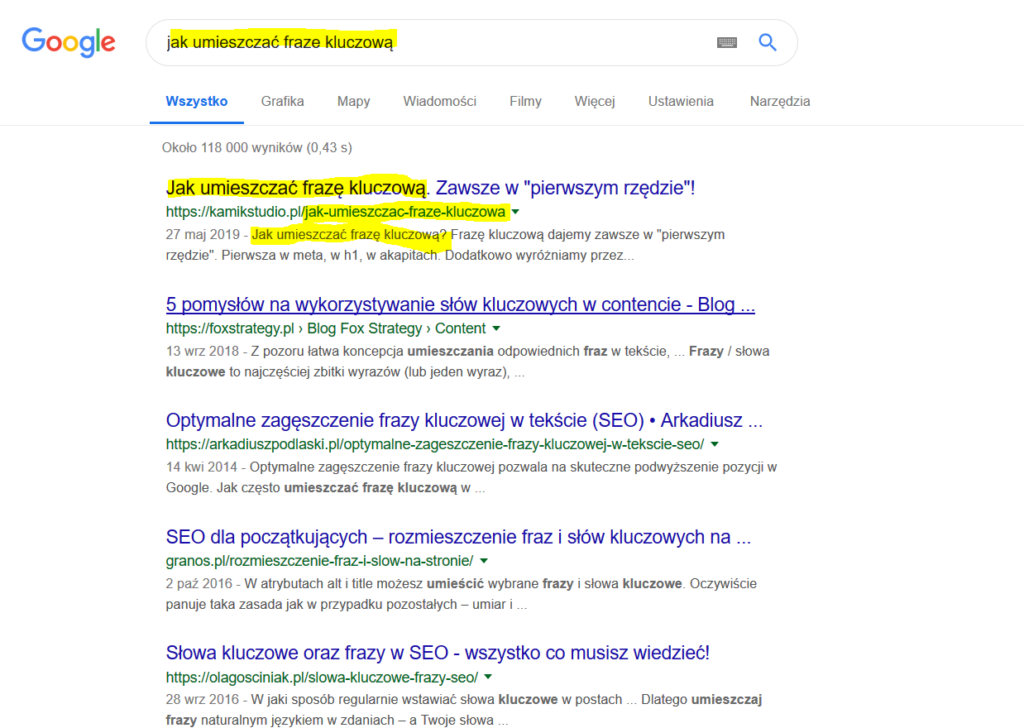
There is one rule! If you really want to rank for a keyword, it must always come first in the "row". Look at the title of this post, look at the description (inspect element - meta description). In the H1, H2, in the paragraph.
When a user types "how to place a keyword" into Google, notice that Google only shows results where the keyword comes first everywhere. Of course, you can double or triple it in the title. But it all has to make sense.
What do we need to watch out for when placing a keyword?
In a text of fewer than 300 words, place the keyword at most 3 times. With fewer than 900 words, at most 6 times. With more than 900 words - as needed. Without overdoing it, of course.
Source: the Yoast plugin homepage, plus my own experience.
Correct keyword placement and its effects
Probably everyone knows that a correctly placed keyword gives us a higher position in search results. We are simply more visible. Of course, we need to give Google a little time. I have also met people who think a search engine is a browser. So let me correct this trivial but wrong thinking. A search engine is where you search, e.g. Google, Bing, Yahoo. A browser is what you browse the Internet with, e.g. Mozilla, Chrome, Opera, Explorer.
When will my site appear on Google
I want to cover this topic in a separate post. But in short: once you have your site with a CMS installed or hand-written code, then:
- Connect Google Analytics and Google Search Console,
- Additionally, you can create a Google Business Profile - the Google listing is free and gives you a lot,
If you don't know what Analytics is, see here: the Analytics guide series. I haven't written or recorded anything about GSC yet, but it is an essential tool. With Search Console you can monitor your URLs, performance, sitemaps and structured data. Extra options appear once you wire up structured data, i.e. Schema. That will be a separate post, and a link will appear here.
What happens once I connect the Google tools
Then all you can do is wait. If you have hooked up sitemap.xml and robots.txt and completed the steps above, all that's left is waiting. Remember to saturate your website with keywords. How to place a keyword - I covered that above. Remember: the better you structure your sitemap, the better your site gets indexed. Look at my example (click the extensions in the second sentence). It is exactly these details that will get you a higher position. A new site usually appears on Google within 7 to 14 business days.
How to find SEO inspiration
The answer is simple. Visit big, powerful companies and look at their source code. Check what META they use, what structured data they have, what scripts they run. Knowledge from smaller sites - even ones like mine - is and always will be more limited. Also remember not to look for answers in books. Someone may laugh at me now. But in six months or a year the book is already outdated. Google changes the SERPs all the time. Google changes its reasoning all the time. It's like trying to learn programming just as a new version of the language comes out.
How to place a keyword so that keyword cannibalization does not occur
Keyword cannibalization is like a life sentence. Once we create a post or page targeting a given keyword, we do not create another one. If I am writing "how to place a keyword" now, I will not write another post about it. When we duplicate topics that mainly target keyword X, keyword cannibalization occurs. Our content loses a lot of its quality.
I think I have covered the essentials and this will do for now. This post will be updated and broken down in more detail. If you have questions, contact me.
Update 2020
In 2020, about a year after publishing this post, I landed in Google's so-called position zero. Google position zero, i.e. the Direct Answer, is a huge distinction, because you are always in first place, ahead of every other site. Position zero is most often occupied by Wikipedia. Below is a screenshot of what it looks like.
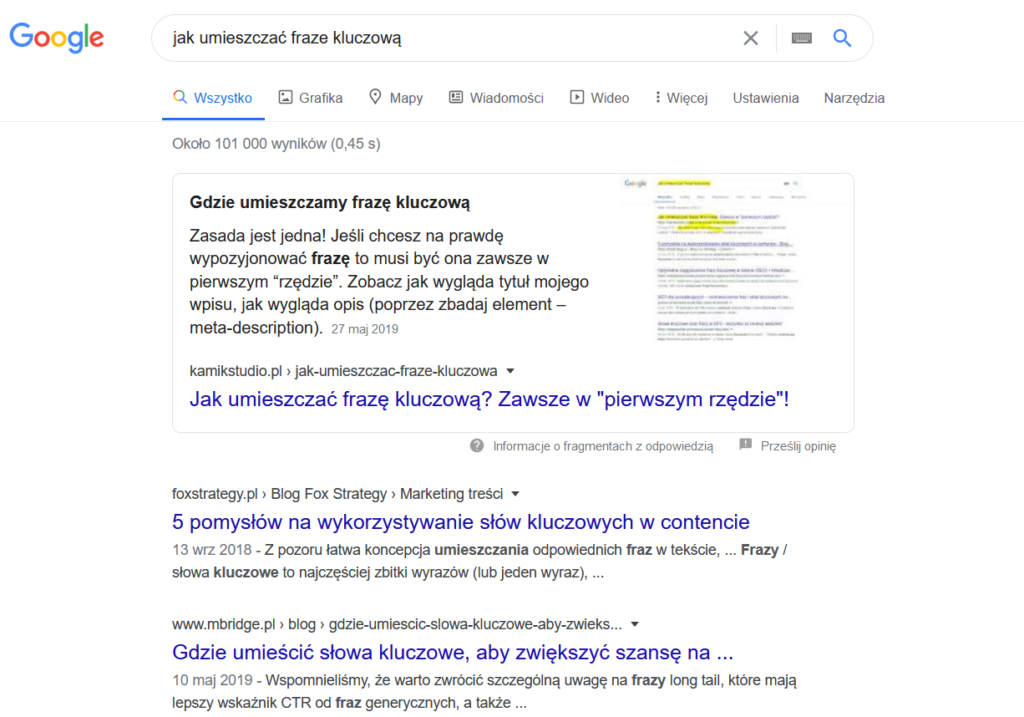
They say position zero is reserved for articles that are described in obsessive detail. As you can see, I am busting that myth.
I will write about the Direct Answer in an upcoming post.
Want to stay up to date? Read the KamikStudio Blog:
- WordPress Malware Keeps Coming Back? A Case Study
- Custom Software or Off-the-Shelf? Running the Numbers for Manufacturing
- How Much Does Custom Software Cost? Real Price Ranges for 2026
- The Standard: What Exactly You Get in Every KamikStudio Project
- How Much Does a Website Cost in 2026 and Where the Price Comes From