
The host said the malware was removed. The site works, the shop takes orders, nothing is flashing red in the dashboard. Three days later Google starts showing URLs on your domain that you never created. When WordPress malware keeps coming back, it usually does not mean the cleanup was sloppy. It means someone removed the symptom instead of the way in. In September 2026 we cleaned a client site four times in twenty-four hours before we found the real cause. It turned out to be a component that passed every check, because it was completely legitimate.
In short
- A WordPress reinfection means the entry vector is still open. Host antivirus scans match files against signatures. They do not find code vulnerabilities or administrator accounts created by the attacker.
- In this case the way in was the paid WPMU DEV Dashboard plugin, affected by CVE-2026-15459, CVE-2026-16051 and CVE-2026-76581. The attacker used it seven times in eight days, with no password and no account.
- Plugins hosted outside the official WordPress repository never appear in the update list, so routine plugin updates skip them entirely.
- The payload was SEO spam: over a million injected URLs in Google's index, visible only to Googlebot.
- A cleanup that includes finding the entry vector takes 2 to 8 hours, which is 400 to 1600 PLN net at our rate of 200 PLN per hour, roughly 95 to 380 EUR.
Why WordPress malware keeps coming back after removal
Let us say this plainly, because it is the heart of the article: deleting malicious files is not the same as removing an infection. The files are the symptom. The cause is the route the attacker used to get in, and if that route stays open, they will return the same way within hours rather than weeks.
The usual procedure that does not work looks like this:
- The host runs an antivirus scan and deletes whatever it flags.
- Someone reinstalls WordPress from the official package.
- Someone changes the FTP and dashboard passwords.
- The site is clean for a while.
- The infection returns.
Each of those steps makes sense on its own. The problem is that none of them answers the question how did they get in. A signature scanner does not check whether one of your plugins has a flaw that lets an attacker upload a new file five minutes after the old one was deleted.
Three things get skipped most often, and they decide the outcome:
- The administrator account the attacker created. Files get deleted, the account stays. The attacker simply logs back in.
- Active sessions. Changing a password does not log out anyone who is already signed in. You have to destroy sessions and rotate the security keys, otherwise the attacker's cookie keeps working.
- The entry vector. Without closing it, the other two points achieve nothing.
How to recognise SEO spam, the infection only Google can see
The most common scenario is not a site that goes down. Quite the opposite: to you and your customers everything looks normal. Only the search engine sees the problem.
The technique is called cloaking. The malicious script checks who sent the request. A normal browser gets the real page. A search engine crawler gets a generated catalogue of counterfeit goods, prescription drugs or online casinos. That is why this can run for months without anyone noticing.
Symptoms worth worrying about:
- Google Search Console shows a rising number of indexed pages you never created, usually following patterns like
/items/,/good/shop/or/shop/pg/with random identifiers. - Searching
site:yourdomain.comreturns URLs that are nowhere in your menu. - Search Console reports security issues, or Google shows a warning before visitors reach your site.
- Organic traffic drops although you changed nothing in your content.
- Email from your domain starts landing in spam because the server is sending messages without your knowledge.
- Chinese or Japanese characters appear in search results under your domain.
On our client's site Googlebot fetched 1,012,153 injected URLs in seven days. Ordinary visitors saw a normal shop the entire time.
What happened, step by step
The client: a WordPress and WooCommerce shop, several years of cooperation, technical industry. The request came in together with the host's confirmation that the infection had been removed.
When we logged into the server, the infection was live. The attacker's most recent files were three hours old. We found 27 malicious files, a fake plugin that recreated a backdoor on every page load, an administrator account created a month earlier, twelve IP addresses using web shells, and an .htaccess file that blocked every PHP script except a whitelist of backdoors.
We performed a full cleanup: forensic copy, quarantine, WordPress core from the official package, removal of the foreign account, session invalidation, key rotation, password changes, IP blocking. The evening check came back clean. The check the next day: the backdoor was back, with a timestamp from a few seconds earlier. The file was recreating itself while the scan was running.
The 49 seconds that explained everything
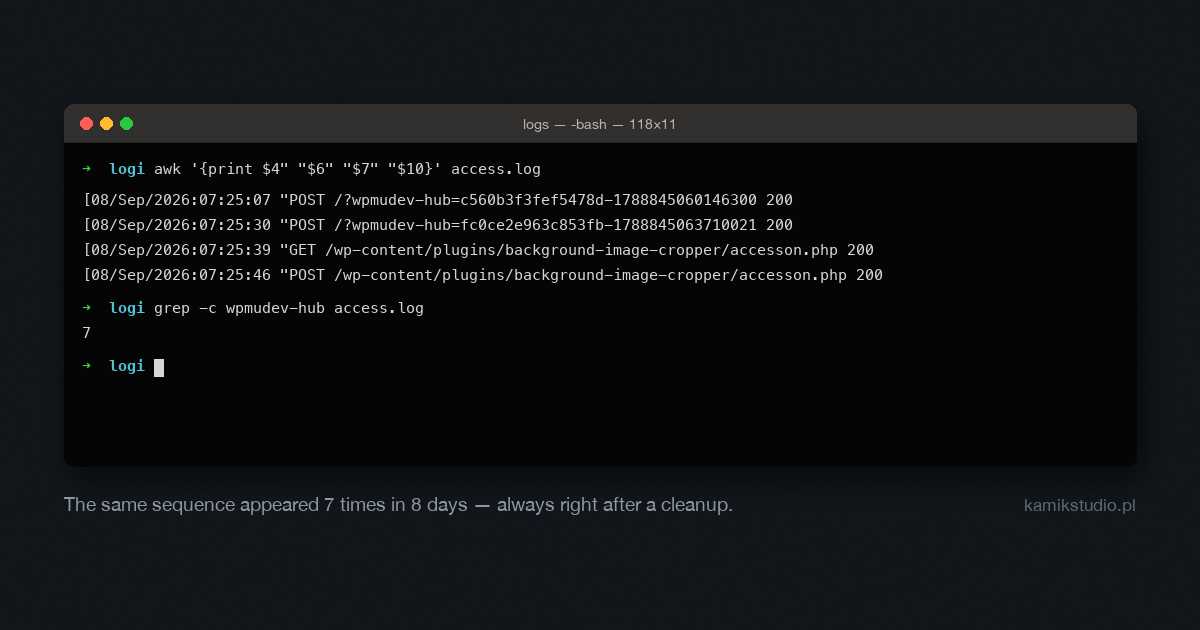
Instead of hunting for more files, we narrowed the server logs down to the minute in which the backdoor appeared:
| Time | Request | Response |
|---|---|---|
| 07:25:00 | GET / | 200 |
| 07:25:07 | POST /?wpmudev-hub=<forged signature> | 200 |
| 07:25:30 | POST /?wpmudev-hub=<forged signature> | 200 |
| 07:25:39 | GET /wp-content/plugins/background-image-cropper/accesson.php | 200 |
| 07:25:46 | POST /wp-content/plugins/background-image-cropper/accesson.php | 200 |
Two requests to a plugin endpoint, and nine seconds later a working web shell. No login, no password, no account involved. We found the same pattern in the logs seven times across eight days, always after a cleanup, from addresses in Estonia, the Netherlands and the United Arab Emirates.
The entry vector: WPMU DEV Dashboard and CVE-2026-15459, 16051 and 76581
WPMU DEV Dashboard is a plugin for managing many WordPress sites from a single panel. Roughly 350,000 installations worldwide. It does exactly what it is designed to do: accept instructions from outside and execute them with administrator privileges. Install plugins, create accounts, sign in without a password.
The version installed on the client site, 5.0.0, was affected by three vulnerabilities:
| Identifier | Score | What it gives an attacker | Fixed in |
|---|---|---|---|
| CVE-2026-15459 | 8.1 | Forging the request signature on the ?wpmudev-hub= endpoint and installing an arbitrary plugin, which means arbitrary code execution |
5.0.1 |
| CVE-2026-16051 | 9.8 | No integrity verification of installed packages and no replay protection on signed requests | 5.0.1 |
| CVE-2026-76581 | 9.8 | An administrator session through inconsistent signing in the single sign-on flow | 5.0.2 |
They all come down to the same thing: the request signature could be forged, so authentication was fiction. The first of these was published on 6 August 2026. On that same day a foreign administrator account appeared on the client's site. That is not a coincidence, it is an automated scanner sweeping the internet for vulnerable installations on the day of disclosure.
And now the single most important sentence in this article:
This plugin is not hosted in the official WordPress repository. It is a paid product and it updates only through a connection to the vendor's panel. It never appears in the list of available updates alongside your other plugins. A routine update of all plugins, performed a few days earlier, covered every other one and could not cover this one. The safe version, 5.0.2, had been available for two weeks.
To be fair: we did not catch it during the first cleanup either. The plugin passed verification as legitimate, because legitimate is exactly what it was.
The attacker uninstalled our security plugin
Eight hours before the check that found the reinfection, the attacker uninstalled the security suite we had deployed the day before. They did not bypass it. They removed it, using the same remote management channel.
There is a lesson here about the limits of such tools. A security plugin runs inside the application it protects. As long as the attacker lacks administrator privileges, it works. Once they have them, it becomes just another file to delete.
How to find a backdoor in WordPress
A backdoor is a file or snippet that lets someone return to the server without logging in. The most common hiding places:
- The site root. Files with system-looking names such as
accesson.php, or a random string like59bef8a914a1.php. - A fake plugin. A directory in
wp-content/plugins/carrying the name of a real, abandoned plugin. In our case it wasbackground-image-cropper, which has a vulnerability of its own, CVE-2024-58348. - The mu-plugins directory. Must-use plugins always load and cannot be disabled from the dashboard.
- The uploads directory. There should not be a single PHP file in
wp-content/uploads/. - The database. Scheduled tasks, rows in the options table, plugins that execute code stored in the database.
- Server configuration files. Entries in
.htaccessthat redirect traffic or unblock specific scripts.
Signatures worth grepping for: eval(base64_decode(, gzinflate, gzuncompress, and authorisation based on a cookie value. Some of these also appear in legitimate code, so verify every hit against the file's checksum.
The most effective method, though, is not hunting for files. Take the creation time of a malicious file and read the server log for that exact minute. The answer is almost always there.
A million spam URLs in Search Console, and how to remove them
Removing the infection does not remove its effects in the search engine. The injected URLs stay indexed, and so do the warnings and the lost rankings. This is separate work, and most guides never mention it.
- Make sure spam URLs return 404 or 410. A 410 tells the crawler the resource is permanently gone and speeds up de-indexing. Do not redirect them to the homepage, that preserves the problem.
- Check robots.txt. Malware often adds its own sitemap there. Remove foreign entries.
- Delete the injected sitemaps and submit the correct one in Search Console.
- Do not block spam URLs in robots.txt. A common mistake. A blocked URL cannot be crawled, so it stays indexed longer.
- Use the URL removal tool in Search Console. It works on prefixes, so one request can cover an entire spam directory.
- Review the list of verified site owners. Attackers add themselves there to keep visibility after the site is cleaned. This is the step people forget most often.
- File a reconsideration request if a security issue warning was shown. Describe what happened and what was fixed.
Realistically: removing the warning usually takes a few days from submission. Clearing a large number of URLs from the index takes weeks. Rebuilding rankings depends on how long the spam was indexed, and after a month-long infection it is often a matter of one or two quarters.
Why a host cleanup or a backup restore is not enough
| Action | Why it is not enough on its own |
|---|---|
| Host antivirus scan | Matches files against signatures. Finds neither code vulnerabilities nor accounts created by the attacker. |
| WordPress reinstall | Replaces the core, leaves plugins, database and accounts untouched. The vector usually sits in a plugin. |
| Password change | Helps only if the attacker got in through a password. In our case they needed none. |
| Backup restore | A pre-infection backup contains the same vulnerable plugin. You restore the exact state in which the break-in is possible again. |
| Security plugin | Valuable as monitoring, but it does not close the flaw and it can be removed by anyone with administrator privileges. |
Pay attention to the fourth row, because it is the most common trap. The host offered our client a restore from a pre-infection backup. We declined, because that backup contained the same plugin in the same version. An earlier restore had ended with the site being taken over again within ten hours.
A cleanup done properly: the order that works
Sequence matters, and it is not the intuitive one. You do not start by deleting things.
- Forensic copy before any change. Files, database, logs. Without it you cannot establish what happened, and for an online shop it may be needed to assess obligations under data protection law.
- Identify the vector from the logs. The only step that actually ends the problem, and the one skipped most often.
- Close the way in. Update or remove the vulnerable component. Only now does cleaning make sense.
- Remove malicious files and verify core and plugins against checksums.
- Review accounts and sessions. Delete foreign administrators, destroy all sessions, rotate the security keys.
- Review the database. Options, scheduled tasks, plugins that execute code from the database.
- Only now rotate passwords. Changing passwords before the way in is closed is worthless.
- Harden and monitor for the following two weeks.
- Clean up Google using the procedure above.
One technical detail is worth checking even without an infection. If you use a firewall such as Cloudflare, make sure your server's IP address cannot be opened directly, bypassing that firewall. On our client's server it could, which made every rule useless:
curl -k -H "Host: yourdomain.com" https://YOUR_SERVER_IP/If you see your site instead of an error, the firewall can be bypassed.
What WordPress malware removal costs
Plain numbers. A cleanup takes us 2 to 8 hours, depending on the type of infection and the state we find. At 200 PLN net per hour that gives:
| Situation | Time | Cost net |
|---|---|---|
| Simple: single backdoor, known vector, small brochure site | 2-3 h | 400-600 PLN (approx. 95-140 EUR) |
| Typical: a dozen or so files, vector to be found in the logs, mid-sized shop | 4-6 h | 800-1200 PLN (approx. 190-285 EUR) |
| Complex: recurring infection, attacker accounts, spam in Google's index | 6-8 h | 1200-1600 PLN (approx. 285-380 EUR) |
What the price includes: forensic copy, identifying the vector from the logs, removing the infection, checksum verification, account and database review, configuration hardening, a written report of what happened, and a follow-up check.
What it does not include: recovering rankings if the spam was indexed for months, rebuilding a site that depends on abandoned unsupported plugins, and ongoing maintenance afterwards. We quote those separately and we say so before starting, not after.
You will find offers starting around 70 EUR. The difference is in what you are actually buying. At the lowest rate you typically get an automated scan and deletion of whatever it flagged, with no log analysis. If the vector stays open, you will pay a second time. Our quote covers finding the way in, because without that everything else is temporary.
For comparison: a day of shop downtime, a Google warning in front of your site, or the loss of rankings built over years all cost many times more than the most expensive row in that table.
How to keep the infection from returning
If you use WPMU DEV Dashboard or any other remote management plugin, check its version manually on the vendor's site. Do not rely on the update list in your dashboard, because products from outside the WordPress repository do not appear there. Then search your server logs for the parameter that plugin uses to accept external commands. In our case searching for wpmudev-hub was enough.
Beyond that:
- Make a list of paid plugins from outside the WordPress repository and check their versions once a month. Those are the ones that fall outside the normal update cycle.
- Remove, do not deactivate. A deactivated plugin still sits on the server and its files may remain reachable.
- Block PHP execution in the uploads directory.
- Disable the dashboard file editor with the
DISALLOW_FILE_EDITconstant. - Enable two-factor authentication for every administrator account.
- Review your user list monthly. Do you recognise every account with administrator rights?
- Search
site:yourdomain.comin Google and look past the first page of results. - Set up file change monitoring so you learn about a new file the same day, not a week later.
What to do now
If your site keeps getting reinfected despite cleanups, start with three things before you pay anyone for another round of tidying up.
- List every paid plugin from outside the WordPress repository and compare its version against the vendor's site. Your dashboard will not tell you.
- Ask your host for the logs from the day the malicious file appeared. Not a scan, the logs. That is where the answer is.
- Review your administrator list and the verified owners in Search Console. One foreign account in either place invalidates the entire cleanup.
If any of those looks wrong, or you have no way to check, get in touch and describe the situation. We start with a free assessment that lets us judge the scale and give you a firm price before any work begins, not after. A cleanup including vector identification takes 2 to 8 hours, which is 400 to 1600 PLN net, roughly 95 to 380 EUR.
Ongoing technical work runs through our support request system. And if you take one thing away from this article, make it this: a message saying the malware was removed is a statement about files, not about access.
Sources
- GitHub Advisory Database, CVE-2026-15459, authentication bypass in WPMU DEV Dashboard: github.com/advisories.
- Wordfence Threat Intelligence, vulnerability analysis for the wpmudev-updates plugin: wordfence.com.
- Patchstack, CVE-2026-76581, authentication bypass via Hub SSO: patchstack.com.
- WPScan Vulnerability Database, CVE-2026-16051: wpscan.com.
- WordPress.org support forum, a thread describing the same attack chain on other sites: wordpress.org/support.
- Google Search Central, removing URLs from search results: developers.google.com.