A finished design that could not simply be "pasted in"
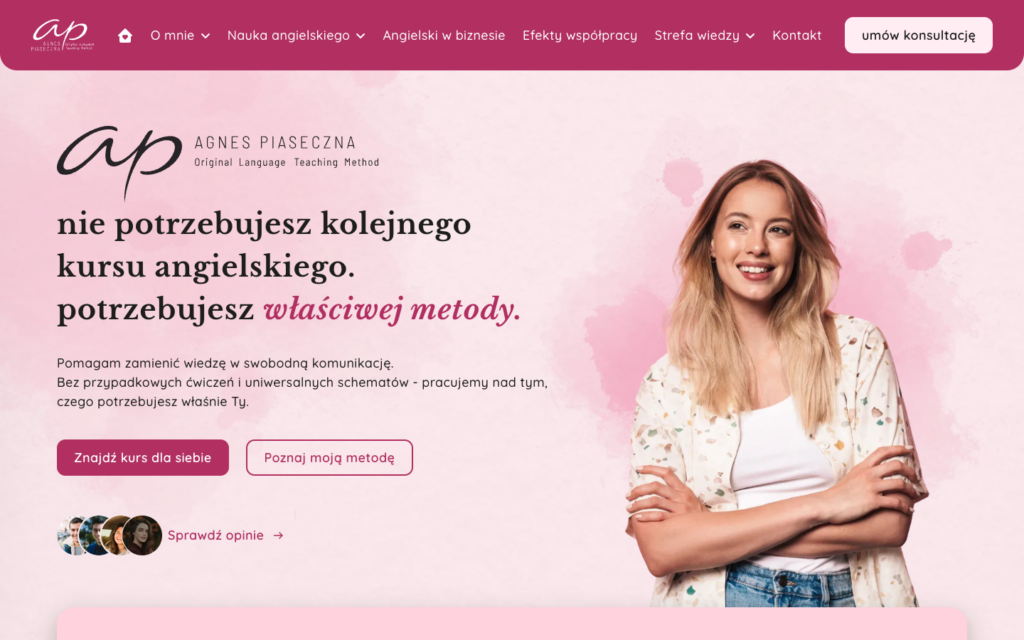
Agnes Piaseczna teaches English with her own 4x15 Method. She came to us with a finished design in Figma, prepared by an outside studio. The task sounded simple: build the site exactly as it looks in the design.
It was not simple. The design had 32 frames: 15 desktop views, the same number for mobile and two extra sections. Each view was anywhere from one and a half to more than ten thousand pixels tall. There was no tablet version at all. And the client wanted to change every text and every image herself later on, without calling a developer.
The design read in full before the first line of code
We did not redraw the design from the screen. We exported it from Figma through its API: the structure of every frame, all images in their original quality and renders of entire views as a reference for comparison. On top of that we built a small tool that turns the design tree into a readable layout description: spacing, alignment, sizes, colours, typefaces and the style of every piece of text.
As a result, a 24-pixel gap in the design was a 24-pixel gap in the code, not "roughly that much". And it also revealed what the design was missing.
The mockup contained the designer's own contact details, sample FAQ questions, a privacy policy copied from the template of a completely different company, seven typos in headings and two different spellings of the method's name. We listed every one of these, fixed it or passed it to the client for a decision. Nothing went into production just because "that is how it was in Figma".
Two sizes: desktop at 1440 px and mobile at 390 px
The designer's contact details and links
Placeholder FAQ questions
Another company's privacy policy
Typos and long dashes in headings
A fluid layout from 320 to 1440 px, with the tablet designed in code
The client's real details, editable from the admin panel
Questions written from the site's content, with structured data for Google
A policy written for this site and the tools it uses
Corrected spelling, one consistent dash
How we built it
Exporting and analysing the design
The structure of every frame, original images and reference renders pulled from Figma. The layout description is generated automatically, so dimensions come from the design file, not from eyeballing it
Foundation and design system
Colours, typography, spacing and shadows as CSS variables. A header with a dropdown menu, footer, buttons, icons, a testimonial slider and a paper-texture background. All of it ready before the first subpage was built
Subpages in parallel
Each subpage got its own template, its own sections and its own stylesheet. Shared elements were locked for editing, so work on one page could not break another
Comparison with the design
A screenshot of every view set against the Figma render, for desktop and mobile, with at least two rounds of fixes per subpage. The tablet was checked separately, because we designed its layout ourselves
Production deployment
Files and database moved from the staging server to the live one, new security keys, enforced HTTPS, a non-www address and an HSTS header
Content editing panel
After launch every section got its own form in the admin panel. The client changes texts, lists, buttons and images herself
Faithful to the design, without a page builder
The theme was written from scratch in PHP, with plain CSS and vanilla JavaScript, no build step and no dependencies. This was a deliberate choice: the site is meant to run for years, and the client edits it in WordPress, which she already knows.
The tablet was the hardest part. The design showed only the two extreme sizes, yet the site is also visited on iPads, small laptops and phones in landscape. Between 768 and 1279 pixels we designed the layout in code, interpolating between the mobile and desktop versions so that every section kept the proportions and hierarchy from Figma.
- Typography that switches by itself between mobile and desktop, with italics and coloured words exactly as in the design
- Libre Baskerville and Quicksand typefaces hosted on the site's own server, with the full set of Polish characters, nothing loaded from Google
- 69 photos and graphics converted to WebP, each with set dimensions so the layout does not jump while loading
- The main image of every subpage loaded with the highest priority
- A two-level menu, a mobile menu that closes with the Escape key and a footer with accordions on mobile
One stylesheet instead of a dozen
The style code is split into readable files: shared ones and a separate one for each subpage. That would mean the browser receiving a dozen or so files, each of which blocks the page from rendering. We solved it on the server: the theme combines the stylesheets for a given view into a single file on the fly, rewrites the paths to images and fonts inside it, and the browser caches it for a year. The developer works with small files, the visitor downloads one.
279 fields and a site that works without them too
The client wanted to edit the content herself. The typical answer would be a page builder, which is exactly what pulls a design apart after the first change. We chose admin forms based on Advanced Custom Fields Pro: 12 field groups, one tab for each section of the page, plus a separate settings page for shared elements.
- Every field has a default value taken from the design, so before the first edit the site looks exactly as it does in Figma
- An empty image field means the image from the design, not a hole in the layout
- Field definitions stored in the theme code rather than the database, so they live in the repository and move with the site
- Pages with a custom layout open in the admin panel without the block editor, with fields only, so the layout cannot be broken by accident
- The main menu and both footer columns managed from the standard WordPress menu screen
- A shared settings page: contact details, social media, the consultation button, the testimonials section, the footer, the 404 page, verification codes and analytics
The editing forms are a convenience, not a condition for the site to work. If the plugin ever stopped working or its licence expired, the site would show the content saved earlier or the defaults from the design, and contact details and analytics would fall back to the standard WordPress screen. No blank page, no broken layout.
Form, consent and SEO without plugins
We wrote the contact form, the cookie consent banner and all of the SEO into the theme. Fewer plugins means fewer updates, fewer conflicts and fewer ways for someone to break in.
- A form with server-side validation, a one-time security token, a bot trap and a limit of five submissions per hour from a single address
- Error messages announced by screen readers and a GDPR information notice next to the fields
- Google Tag Manager with Consent Mode v2: analytics and marketing off by default, the "Reject" button as prominent as "Accept"
- Without a container ID entered, no tracking script and no banner is loaded at all
- A submitted form and a saved consent choice are pushed to the data layer as events ready for measurement
Search engines and AI assistants
Title, description, sharing image, canonical URL and noindex can be set separately for every page, post, category and tag. Empty fields are not an error, just a signal for the theme to use a sensible default. The site describes itself to search engines with structured data: as a website, as the person running the lessons, with breadcrumbs, blog articles and an FAQ section.
We also set a separate policy for AI bots. Assistants that cite pages live in their answers are allowed in. Crawlers that harvest content in bulk to train models are blocked, because the texts on the site are the client's own material. The theme also generates an llms.txt file describing the site for language models.
Accessibility and tests at every width
The site passed an automated WCAG 2.2 AA accessibility audit without a single violation. On top of that come the things an automated tool cannot check: touch targets of at least 44 pixels, visible focus during keyboard navigation, one H1 heading per view and sections labelled with headings.
The layout test is a script that opens every subpage at five widths and checks four things: whether the page scrolls horizontally, whether all images have loaded, whether each has alt text and dimensions, and how many H1 headings there are. We ran it after every larger change, not once before handover.
Technologies
PHP
Custom classic theme
CSS without a framework
Dependency-free JavaScript
Advanced Custom Fields Pro
Figma REST API
Google Tag Manager
Consent Mode v2
Schema.org JSON-LD
WebP
axe-core
WP-CLI
Results
What this project teaches
A finished design shortens the road, but it does not end it. A mockup shows how a site should look, not how it should work: what about a photo the client does not have yet, what about a tablet nobody drew, what about a privacy policy that describes someone else's company. Being faithful to the design is half the work. The other half is everything the design does not show, but which visitors and search engines notice straight away.
That is why it mattered just as much that the site survives its first content edit as that it reproduces Figma. Fields with default values, a layout locked against accidental breakage and the ability to work without the plugin mean that a year from now the site will still look the way it was designed.